
The trouble with scattered bookings
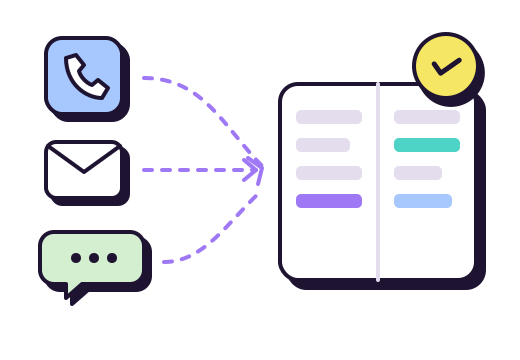
The picture is a familiar one. The paper book sits by the till, the inbox is on the office computer, the direct messages are on the owner’s phone, and a few bookings live on a till receipt or in a server’s memory. Each of these channels works on its own. Together, they produce the same accidents:
- the double-booked table, because the booking made by message never reached the book;
- the forgotten guest, because the email was read on a day off and never handled;
- the badly prepared room, because nobody has the exact cover count before service;
- a team that depends on one person, the one whose phone receives the messages.
The more ways there are to book, the more likely these accidents become. The answer is not to close doors: guests will always write through the channel that feels natural to them. It is to bring everything back to one place.
One list for the whole team
Set one simple rule, written down and known by everyone: a booking only exists if it is in the list. Not in a message, not on a sticky note, not in someone’s head.
- Pick the list: one paper book or one booking tool, but only one. If you take online bookings, it has to be that tool, because it is the one that knows which tables are free.
- Enter it straight away, the moment the booking is accepted, not “later”: that gap is when the table goes to someone else.
- Make the list available to everyone who takes bookings, on the floor tablet for instance.
- Never confirm to the guest before entering it. “That’s booked” should be true.
Note where each booking came from
Knowing where your bookings come from is not a detail. Over a few months, you will see whether the phone is still your main channel, whether your social media posts really bring in tables, or whether walk-ins matter more than you thought.
In gonnabook.it, a booking taken by phone or by message is entered in the same list as those made through the widget, with its source: Phone, Walk-in or Other.
If you keep a paper book, just add a column with a letter: P for phone, M for message, E for email, W for walk-in. It is basic, but it is already a measure.
Reply to messages with your booking link
Direct messages and emails are convenient for guests but costly for you: read, check availability, reply, wait for the answer, enter the booking. When someone writes to book, the most efficient reply is often your booking link, which shows the free times and sends a confirmation. Whether that confirmation goes out on its own or after you approve it is the choice between instant confirmation and manual approval.
A reply to keep among your saved replies:
Hi, thanks for your message! The easiest way to book is this link, which shows our free tables and sends you a confirmation: [your link]. For a group of more than eight, just reply here and we will sort it out.
It is not a brush-off: for a group, a regular or a special request, take the booking yourself, and enter it in the list. To make the link easy to hand out, put it wherever guests find you: see where to put your booking link.
On Instagram, a business account can also show an action button: Instagram’s help notes that only one button shows at a time and that it connects to a partner service. Otherwise, the link in your profile does the job. On your Google Business Profile, the Reservations section takes a link too: use the same one.
And the phone?
For many restaurants, the phone is still the first booking channel, and it tends to ring at the worst moment. The same rule applies: the list within reach, the booking entered during the call. Our advice on handling phone bookings during service, voicemail included, applies here too: a greeting that gives the link takes pressure off the team.
Guest data in the right place
A booking holds personal data: a name, a phone number, sometimes an allergy. In France and across the EU, article 5 of the General Data Protection Regulation (GDPR) requires that this data be limited to what is necessary, kept no longer than necessary and protected by appropriate security.
In practice:
- ask only for what you need to book: name, party size, date, time, a way to reach the guest;
- do not let your guest list live on a personal phone: once the booking is entered, the message no longer needs to be kept;
- prefer business accounts, shared by the team, over everyone’s private messaging apps.
For more, see our article on GDPR and your restaurant guest list.
A weekly sweep of your inboxes
Once a week, go through every channel: unread messages, pending emails, group requests left unanswered. Compare with the list. In the first weeks you will find a few misses; after that, fewer and fewer. That is the sign the rule has become a habit.
Frequently asked questions
How do I keep all restaurant bookings in one place?
Choose a single list, a paper book or a booking tool, and enter every booking the moment it is accepted, whatever the channel: phone, email, direct message or counter. If you take online bookings, that list must be your online tool, because it is the one that knows which tables are free. Everyone on the team who takes bookings needs access to it.
Should I accept bookings through Instagram direct messages?
You can, as long as you enter them in your list straight away, before confirming. To save time, many restaurants reply with their booking link, which shows the free times and sends a confirmation, and keep handling bookings themselves for groups, regulars and special requests. Either way, the message is not the booking: the entry in the list is.
Why record where a booking came from?
To know which channels really bring in guests. Over a few months, the share of phone, website, social media and walk-ins tells you where to put your effort: a clearer voicemail greeting, a better-placed link, more useful posts. Without that information, those choices rest on impressions rather than facts.
Sources
- CNIL, General Data Protection Regulation, chapter II “Principles”, article 5, consulted on 2026-11-18 (in French).
- Instagram Help Centre, Add an action button to your Instagram business account, consulted on 2026-11-18.
- Google Business Profile Help, Manage your local business links, the profile’s booking links, consulted on 2026-11-18.